
SharePoint External User Help
This page is for SharePoint users who have been invited to collaborate with MDH via an MDH SharePoint page or site.
On this page:
Step 1: Receive Email from MDH
Step 2: Login
Step 3: Success!
Troubleshooting
MDH Help
Step 1: Receive Email from MDH
Search your inbox for your initial invite from MDH. Search on "wants to share" to find an email from your contact at MDH. That email confirms that you have been added to our site - and the specific email used on our site.
- URL: In the body of the email, it will say Go To and then a linked site name. Click to visit the site. Right click to copy that URL.
- Username: The email is addressed to you at a particular email. Look in that To: field to double check that email - this is your username.
Step 2: Login
- URL: Click on the link from the email (Step 1) or right click on that link to copy it to a different browser.
- Username: Work email that received email in Step 1
- Password: Usually your regular work password. Occasionally it is a password that you setup for your Microsoft account.
- Terms of Use: You must open the Terms and agree to them each day that you access the site.
Step 3: Success!
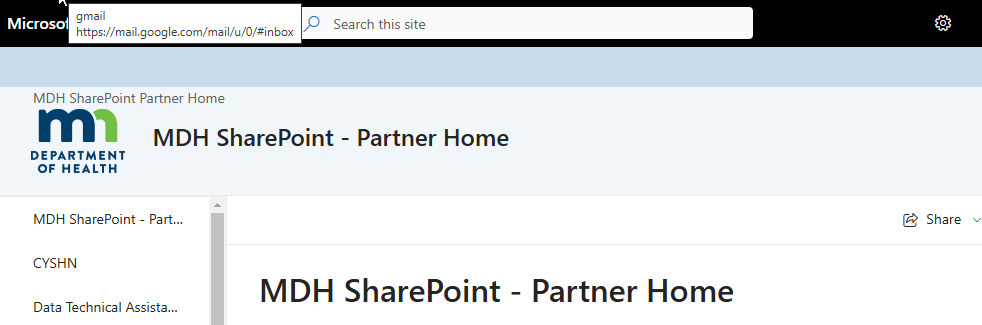
If you successfully reach our site, it will look something like this - though with different topics listed. If you do not reach the MDH SharePoint site - see the troubleshooting tips below.
Troubleshooting
For almost all problems, the first thing to try is logging in via an Incognito (Chrome) or InPrivate (Edge) browser window. These sites don't use cache/cookie data, so you will have to enter your work email and your password, which ensures that SharePoint is using this exact data - not credentials it has stored somewhere on your computer.
Incognito/InPrivate
- Open a new Incognito (Chrome) or InPrivate (Edge) window. It doesn't matter which.
- Paste in the URL of your site from Step 1.
- Enter your username, your password, and agree to the Terms of Use
- If this work - try accessing the site without the Incognito/InPrivate window in a week or two - when your cache/cookie data on your computer has cleared out.
Username Issues: When you enter your username, you get an error message. "User not found in directory". Since you received an email inviting this email to the permission group - this is not correct. Try the Incognito/InPrivate window solution.
Password issues:
- The password you enter is incorrect.
Try your regular work password. If that does not work, you may have signed up for your own Microsoft account with your work email. You can change these passwords (but not ones set up by your IT and directly linked to your agency) with Microsoft. - Microsoft sends you a code.
Check your email. A code is a form of two-factor authentication. You may also be able to select "use a password instead". If the only option is to sign in with a code and you aren't receiving the code - talk to the IT at your own agency. They can check how your account is set up in their records.
Overall login issues: You will get messages such as Access denied, Doesn't have permission - or the site simply won't open. Try the Incognito/InPrivate solution listed above.
New Email: Sometimes your email changes, usually due to a name change or an email domain change at your agency. You can continue to use your old email as a username for awhile. But if it stops working, or you really want to change to your new email, MDH staff can have your old email removed from our system and re-add your new email. The process takes 1-3 weeks but is very effective for name changes and stubborn login problems.
MDH Help
If you have tried all of the troubleshooting tips, but still cannot login, please do contact your MDH SharePoint person. That will either be the person who sent you the initial invitation, or the person running your program at MDH, who can do additional troubleshooting. We very much want you to be able to access this resource.